
React Three Fiber Sticker 3D App
This project is a React application that allows users to place stickers on a 3D model of a can using React Three Fiber. The app provides an interactive experience where users can rotate the 3D model and place the stickers anywhere they want.
Check it out at halloween-react-app.com
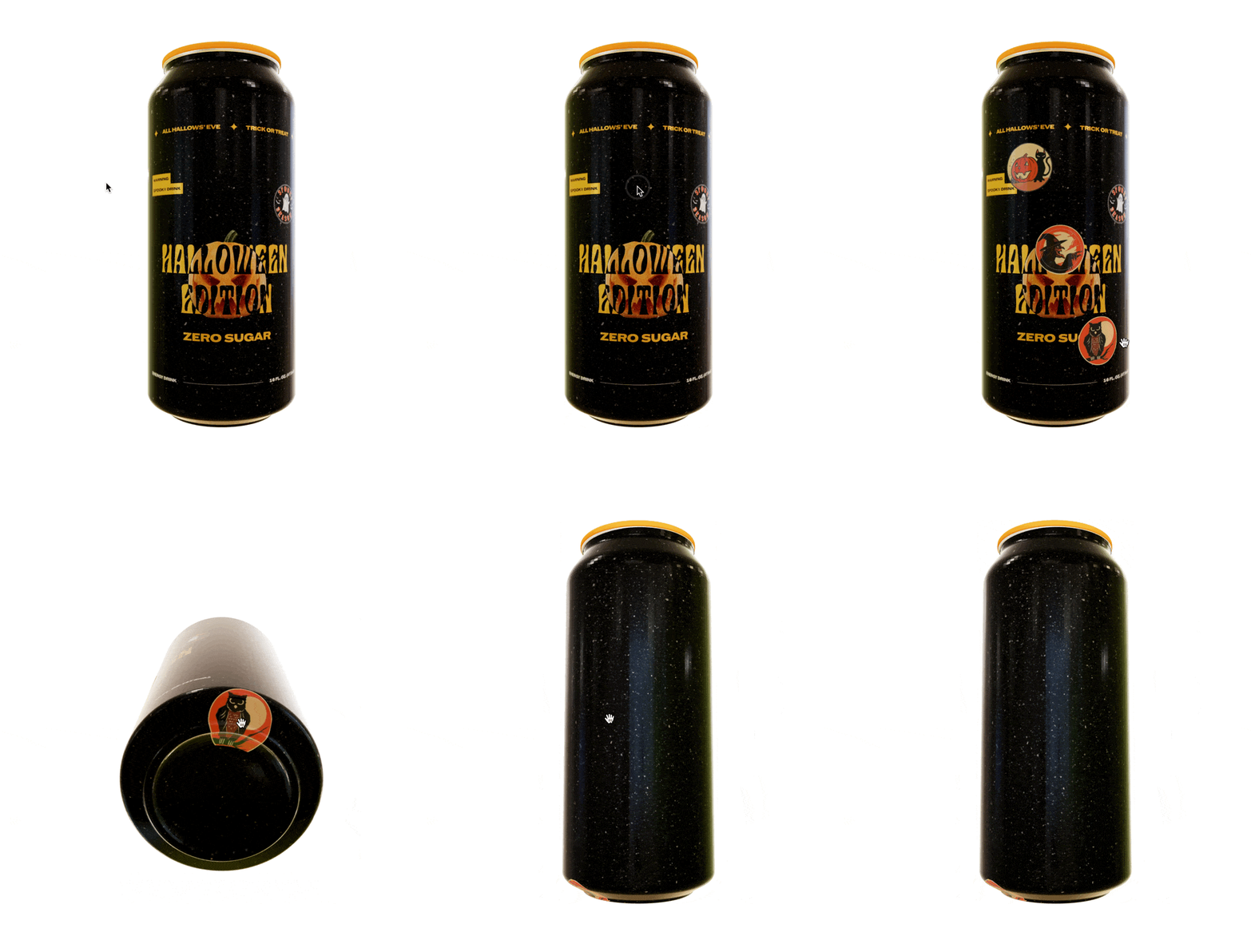
3D Model Component
I built HalloweenCan as an interactive React Three Fiber component that lets users place sticker decals directly onto a 3D can model in real time.
I load the GLTF model using useGLTF and break it into discrete meshes body, lid, and top, so I can isolate interactions to the can body while keeping the rest of the model static. I keep a ref to the body mesh to calculate accurate surface transforms from pointer events.
As the user moves their cursor across the can, I continuously compute a decal friendly position and rotation using decalTransformFromEvent and store it as a live preview state. When the mesh is hovered, I render a temporary “ghost” sticker that follows the cursor, giving immediate visual feedback before placement.
export function HalloweenCan(props) {
  const { nodes, materials } = useGLTF('/halloween-cans-new.glb')
  const meshRef = useRef()
  const [preview, setPreview] = useState({
    pos: [0, 0, 0],
    rot: [0, 0, 0],
  })
  const [isHovered, setIsHovered] = useState(false)
  const [stickers, setStickers] = useState([])
  const [stickerIndex, setStickerIndex] = useState(0)
  const stickerCollection = [
    {
      img: catSticker,
      label: 'black cat',
    },
    {
      img: witchSticker,
      label: 'witch with a hat',
    },
    {
      img: owlSticker,
      label: 'scary owl',
    },
    {
      img: skullSticker,
      label: 'skull with a candle',
    },
  ]
  const [offsetValue, setOffsetValue] = useState(-10)

  function handlePlaceSticker() {
    const audioSticker = new Audio(stickerAudioEffect)
    audioSticker.volume = 0.05
    audioSticker.play()

    if (stickerIndex + 1 > stickerCollection.length - 1) {
      setStickerIndex(0)
    } else {
      setStickerIndex(stickerIndex + 1)
    }

    setOffsetValue(offsetValue - 1)

    setStickers([
      ...stickers,
      {
        mousePosition: preview,
        texture: stickerCollection[stickerIndex],
        offset: offsetValue,
      },
    ])
  }

  return (
    <group {...props} dispose={null} scale={1} rotation={[0, Math.PI / 2.5, 0]}>
      <mesh
        ref={meshRef}
        geometry={nodes.Can_2__Body.geometry}
        material={materials['Brushed Aluminum 2.001']}
        rotation={[0, -0.244, 0]}
        onPointerEnter={() => setIsHovered(true)}
        onPointerLeave={() => setIsHovered(false)}
        onPointerMove={(e) => setPreview(decalTransformFromEvent(e, meshRef))}
        onClick={() => handlePlaceSticker()}
      >
        {stickers.map((sticker, index) => (
          <Sticker key={index} sticker={sticker} />
        ))}
        {isHovered && (
          <Sticker
            key={'cloned'}
            sticker={{
              mousePosition: preview,
              texture: stickerCollection[stickerIndex],
              offset: offsetValue,
            }}
          />
        )}
      </mesh>
      <mesh
        geometry={nodes.Can_2__Lid.geometry}
        material={materials['Brushed Aluminum 3.002']}
        position={[0, 1.478, 0]}
        rotation={[0, -1.361, 0]}
        scale={0.975}
      />
      <mesh
        geometry={nodes.Can_2__Top.geometry}
        material={materials['Brushed Aluminum 4.002']}
        position={[0, 1.473, 0]}
        rotation={[0, -0.332, 0]}
      />
    </group>
  )
}
Helpers
Sticker
I built the Sticker component as a focused rendering primitive responsible for translating a stored interaction state into a physically accurate decal on the 3D mesh.
For each sticker, I dynamically load the texture using useTexture and apply it through a <Decal> wrapper, positioning and rotating it precisely based on the pointer-derived transform captured at placement time. This ensures the decal conforms correctly to the surface orientation of the underlying geometry.
function Sticker({ sticker }) {
  const texture = useTexture(sticker.texture.img)
  return (
    <Decal
      debug={false}
      position={sticker.mousePosition.pos}
      rotation={sticker.mousePosition.rot}
      scale={0.2}
    >
      <meshPhysicalMaterial
        map={texture}
        side={THREE.FrontSide}
        map-anisotropy={16}
        map-flipY={true}
        polygonOffset // Ensures decal is rendered on top
        polygonOffsetFactor={sticker.offset} // Push decal slightly forward based on index
        iridescence={1}
        iridescenceIOR={1}
        iridescenceThicknessRange={[0, 1400]}
        roughness={1}
        clearcoat={0.5}
        metalness={0.75}
        toneMapped={false}
        premultipliedAlpha={true}
        transparent
        alphaTest={0.5}
      />
    </Decal>
  )
}
Decal Transform From Event
I wrote decalTransformFromEvent to reliably convert raw pointer interaction data into a stable, decal ready transform aligned to the surface of a 3D mesh.
When a pointer event fires, I first convert the world space hit point into the mesh’s local coordinate space. This ensures that decal placement remains correct regardless of the mesh’s position, rotation, or scale in the scene.
AI was extremely helpful to get the math and three.js specifics right for this function.
function decalTransformFromEvent(e, meshRef) {
  const mesh = meshRef.current
  // local hit point
  const pLocal = mesh.worldToLocal(e.point.clone())
  // local normal (from face), flip to face the ray
  const nLocal = (
    e.face?.normal.clone() || new THREE.Vector3(0, 0, 1)
  ).normalize()
  const inv = new THREE.Matrix4().copy(mesh.matrixWorld).invert()
  const rayDirLocal = e.ray.direction
    .clone()
    .transformDirection(inv)
    .normalize()
  if (nLocal.dot(rayDirLocal) > 0) nLocal.multiplyScalar(-1)
  // tiny lift off surface
  pLocal.addScaledVector(nLocal, 0.002)
  // stable rotation (hint: Y axis for cans)
  const rot = rotationFromNormalLocal(nLocal, new THREE.Vector3(0, 1, 0))
  return { pos: [pLocal.x, pLocal.y, pLocal.z], rot: [rot.x, rot.y, rot.z] }
}
Rotation From Normal Local
I wrote rotationFromNormalLocal to generate a stable, predictable decal orientation from a surface normal, even in edge cases where naïve normal based rotations tend to break down.
I start by treating the local surface normal as the decal’s forward axis (+Z). From there, I attempt to construct a full orthonormal basis by crossing the normal with an upHint vector to derive a right axis. This gives the decal a consistent “upright” orientation rather than allowing it to spin arbitrarily around the normal.
AI was extremely helpful to get the math and three.js specifics right for this function.
function rotationFromNormalLocal(nLocal, upHint = new THREE.Vector3(0, 1, 0)) {
  const z = nLocal.clone().normalize() // decal +Z = surface normal
  let x = new THREE.Vector3().crossVectors(upHint, z) // right
  if (x.lengthSq() < 1e-6)
    upHint =
      Math.abs(z.y) > 0.99
        ? new THREE.Vector3(1, 0, 0)
        : new THREE.Vector3(0, 1, 0)
  x.crossVectors(upHint, z).normalize()
  const y = new THREE.Vector3().crossVectors(z, x)
  const q = new THREE.Quaternion().setFromRotationMatrix(
    new THREE.Matrix4().makeBasis(x, y, z),
  )
  return new THREE.Euler().setFromQuaternion(q, 'XYZ')
}
Dependencies
import * as THREE from 'three'
import { useGLTF, Decal, useTexture } from '@react-three/drei'